
Best Google Analytics Reporting Tools for Agencies [2026]
By Varun, Founder of ReportsMate - last updated July 2026
Modern marketing relies on one thing: clarity through data. Every click, scroll, and conversion tells a story about your audience. But when you're juggling multiple clients and campaigns, extracting insights from endless GA4 metrics can feel like decoding a mystery.
That's why agencies, consultants, and business owners turn to Google Analytics reporting tools that simplify complexity. With Google Analytics 4 (GA4) now the standard, agencies need smarter ways to understand user behaviour, track performance, and visualise progress without burning hours on manual reports.
In this guide, we compare the seven best Google Analytics reporting tools for agencies in 2026 - including ReportsMate, our own email-first reporting platform - with honest pros, cons, and pricing for each. Whether you manage five client accounts or a hundred, one of these tools fits your workflow and budget.
How We Evaluated These Tools
We run an agency-focused reporting product, so we know exactly where GA4 reporting tools break down at scale. Every tool on this list was assessed against five criteria that matter to agency operators:
- Multi-client fit - How painful is it to manage 20, 50, or 100 client accounts? Is setup repeatable or does every client mean rebuilding from scratch?
- GA4 API depth - Does the tool pull real GA4 API data (sessions, users, conversions, traffic sources, landing pages, device, geo), or just a few surface metrics?
- Client delivery method - Do reports reach clients where they already are (email inbox), or do clients need to log into yet another portal?
- White-label options - Can you put your agency's brand on the report, and at what plan level?
- Pricing model - Flat fee, per client, per dashboard, or per data source? The model matters more than the sticker price once you scale.
We're transparent about the fact that ReportsMate appears first. The disclosure is right there in the section, and the pros and cons for every tool - including ours - are written to be genuinely useful, not promotional.
Why You Need an Automated Analytics Solution
Even skilled marketers struggle with the volume of data GA4 produces. Between event tracking, traffic source analysis, and conversion reports, it's easy to get lost in spreadsheets instead of acting on insights.
A good GA4 reporting automation tool helps you:
- Track performance metrics with reliable, API-sourced accuracy.
- Visualise data in clear, digestible formats clients understand.
- Understand user behaviour analytics and engagement trends.
- Identify drop-offs with conversion tracking.
- Deliver client-ready reports on schedule without manual effort.
In short, it transforms raw data into actionable insights - and gives you back the hours you currently lose to copy-pasting numbers into slide decks.
The 7 Best Google Analytics Reporting Tools in 2026
1. ReportsMate - best for automated, email-first GA4 client reports
Full disclosure: ReportsMate is our product. We built it because we ran agency reporting ourselves and got tired of two things: per-client pricing that punished growth, and dashboard links clients never opened.
ReportsMate connects natively to GA4 and delivers scheduled, white-label reports straight to your client's inbox - daily, weekly, or monthly. Each report covers sessions, users, conversions, bounce rate, traffic sources, top landing pages, and device and geographic breakdowns, all with period-over-period comparison. An AI-written summary sits at the top of every report, explaining in plain language what changed and why it matters, so clients don't need to interpret charts themselves.
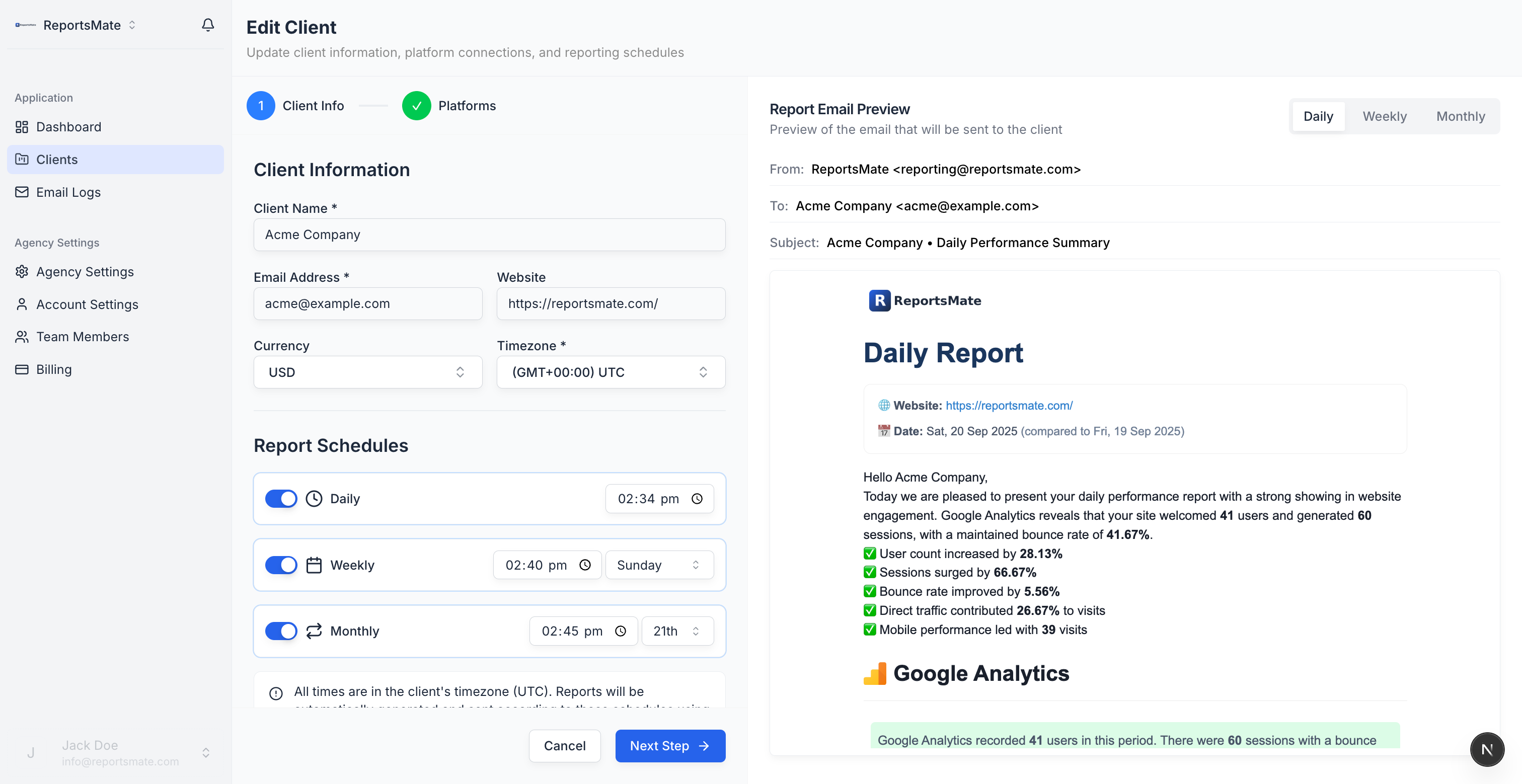
It also pulls Google Ads, Meta Ads, Google Search Console, Google Business Profile, LinkedIn Ads, and TikTok Ads into the same report, so GA4 traffic data sits next to paid and local performance.
- Pros: Email-first delivery clients actually read; flat-fee pricing that doesn't grow per client; AI summaries remove manual commentary writing.
- Cons: No interactive drag-and-drop dashboard builder - if your clients demand a live login portal, this isn't that.
Pricing: Flat fee - $29/month for 20 clients, $69/month for 50, $129/month for 100. Free 14-day trial, no card required.
2. AgencyAnalytics - best for agencies that want client login dashboards
AgencyAnalytics is one of the most established names in agency reporting, with 80+ integrations, live dashboards, and scheduled PDF reports. Its GA4 widgets are mature and well-documented, and the white-label client portal is a genuine differentiator: clients get their own login under your agency's domain and branding.
The trade-off is the pricing model. AgencyAnalytics charges per client campaign, which is manageable at 5 clients and painful at 50 - your reporting bill grows in lockstep with your client list. Setup is also per-client: templates help, but each new account still needs dashboard configuration before it looks right.
- Pros: Huge integration library; polished live dashboards; strong white-label client portal.
- Cons: Per-client pricing scales your costs with your roster; dashboards still need hands-on setup and maintenance per client.
Pricing: From around $59/month for 5 client campaigns; effectively $12-18 per client per month depending on tier.
3. DashThis - best for quick preset dashboards
DashThis is the friendliest dashboard tool on this list. It leans hard on preset templates: connect GA4, pick a template, and you have a presentable client dashboard in minutes. For small teams without a dedicated reporting person, that speed is the whole pitch.
The limits show as you grow. Pricing is per dashboard, so an agency with 30 clients needs 30 dashboards on a plan priced accordingly. Custom metrics and deeper GA4 dimensions are more constrained than in AgencyAnalytics or a hand-built Looker Studio report, and delivery is primarily a shareable dashboard link with an optional scheduled email snapshot rather than a true narrative report.
- Pros: Fastest setup on this list; clean, non-technical interface; solid preset GA4 templates.
- Cons: Per-dashboard pricing gets expensive at scale; limited flexibility for custom metrics and blended data.
Pricing: From around $49/month for 3 dashboards; plans scale to 10, 25, and 50+ dashboards.
4. Whatagraph - best for larger, cross-channel agencies
Whatagraph targets mid-size and large agencies that need heavy cross-channel blending: GA4 next to paid social, search, email, and CRM data, with the ability to push everything into BigQuery. Its reports are visually strong, and its data-transfer features make it part reporting tool, part data platform.
That power comes at enterprise-adjacent pricing. Entry plans start around $249/month billed annually, with annual contracts standard. For a boutique agency reporting on GA4 plus one or two ad platforms, Whatagraph is genuinely overkill - you'd be paying for blending and warehousing capability you won't touch.
- Pros: Excellent multi-source blending; strong visual polish; BigQuery data transfer for agencies with data teams.
- Cons: Expensive entry point with annual commitment; far more platform than small agencies need.
Pricing: From around $249/month, billed annually; custom pricing for higher volumes.
5. Porter Metrics - best for Looker Studio power users
Porter Metrics isn't a standalone reporting app - it's a set of connectors and templates that make Looker Studio usable for marketers. If you're committed to Looker Studio but frustrated by its native connector gaps and quota errors, Porter fills the holes with reliable connectors for GA4, Meta Ads, TikTok, and more, plus agency-ready templates.
The catch is that you're still in the Looker Studio world: you build the reports, you maintain them, and your clients still receive a dashboard link. Porter reduces the connector pain considerably, but it doesn't automate delivery or write narrative summaries for you.
- Pros: Cheap; agency templates save real build time; fixes Looker Studio's connector reliability problems.
- Cons: Entirely dependent on Looker Studio; reporting workflow is still manual build-and-maintain.
Pricing: From around $15/month per connector plan; free tier available with limits.
6. Looker Studio - best free DIY option
Looker Studio (formerly Google Data Studio) is Google's own free dashboard builder, with a native GA4 connector. For agencies with time and a capable analyst, it offers unlimited flexibility: any metric, any dimension, any layout, fully brandable, at zero software cost.
The cost is your hours. Every dashboard is built by hand, breaks when GA4 schemas or connector quotas change, and needs ongoing maintenance per client. The native GA4 connector is also subject to API quota limits that can produce broken charts on busy properties. Delivery is a shared link or a basic scheduled PDF - there's no narrative layer, so someone still has to explain the numbers to the client.
- Pros: Free; total layout and metric flexibility; native Google ecosystem integration.
- Cons: Significant build and maintenance time per client; GA4 connector quota issues; no automated plain-language summaries.
Pricing: Free. Third-party connectors (Porter, Supermetrics) cost extra if you need non-Google sources.
7. Supermetrics - best as a data pipeline, not a reporting tool
Supermetrics is the odd one out on this list because it doesn't produce reports at all - it moves marketing data. It extracts GA4, ads, and social data into Google Sheets, Looker Studio, Excel, or a data warehouse like BigQuery, where you (or your BI stack) build the actual reporting.
For agencies with a data engineering mindset, it's best-in-class extraction: deep field coverage, reliable syncs, and warehouse destinations that scale to serious volumes. For everyone else, it's only half a solution - you still need to build the report, the delivery, and the commentary on top of the data Supermetrics moves.
- Pros: Deepest raw GA4 data extraction here; warehouse-grade destinations; scales with a real data stack.
- Cons: Not a client-facing reporting tool by itself; per-source licensing adds up quickly across platforms.
Pricing: From around $29/month per data source and destination; multi-source agency setups commonly run into hundreds per month.
Comparison Table: GA4 Reporting Tools at a Glance
| Tool | Pricing model | GA4 depth | Delivery | White-label |
|---|---|---|---|---|
| ReportsMate | Flat fee: $29/$69/$129 for 20/50/100 clients | Full API: sessions, users, conversions, sources, landing pages, device, geo | Automated email + PDF, AI summaries | Yes, incl. custom sending domains |
| AgencyAnalytics | Per client (~$12-18/client/mo) | Strong prebuilt GA4 widgets | Client portal + scheduled PDF | Yes, incl. client logins |
| DashThis | Per dashboard (from ~$49/mo) | Good preset templates, limited custom metrics | Dashboard link + email snapshot | Yes |
| Whatagraph | Flat tiers (from ~$249/mo, annual) | Strong, blends GA4 cross-channel | Live links + scheduled reports | Yes |
| Porter Metrics | Per connector (from ~$15/mo) | Depends on your Looker Studio build | Looker Studio dashboards | Via Looker Studio |
| Looker Studio | Free | Native connector, quota-limited | Shared link + basic scheduled PDF | DIY |
| Supermetrics | Per data source (from ~$29/mo) | Deepest raw extraction | None - feeds other tools | N/A |
Which Google Analytics Reporting Tool Should You Choose?
There's no single winner - the right pick depends on how your agency operates:
- Freelancer or small agency (up to 20 clients) that wants reporting off its plate: ReportsMate. Flat $29/month, reports send themselves, clients read them in their inbox.
- Growing agency (20-100 clients) watching margins: ReportsMate again - flat-fee pricing is the difference between a $69 reporting bill and a $900 one at 50 clients on per-client tools.
- Agency whose clients expect a live, login-anytime dashboard: AgencyAnalytics. The white-label client portal is the best in this group.
- Small team that wants presentable dashboards today with zero learning curve: DashThis.
- Mid-to-large agency blending GA4 with many channels, with budget and a data appetite: Whatagraph.
- Team already invested in Looker Studio that just needs better connectors: Porter Metrics.
- Zero software budget and an analyst with spare hours: Looker Studio, accepting the build and maintenance cost.
- Agency with a data team piping marketing data into a warehouse or BI tool: Supermetrics, paired with whatever builds your client-facing layer.
A useful rule of thumb: if your clients open emails but never open dashboards (check your own send logs - most agencies find exactly this), choose an email-first tool. If your retention pitch depends on clients logging in and exploring data themselves, choose a portal-first tool.
How to Choose the Right Google Analytics Reporting Tool
Whichever way you lean, here's what separates good GA4 reporting tools from great ones:
Native GA4 support - The tool must connect directly to the GA4 API, not Universal Analytics. GA4's event-based model is fundamentally different, and only natively built integrations surface the right metrics correctly.
Automated scheduling - Reports should send on a set cadence without manual triggering. Once configured, a client's monthly GA4 report should just arrive in their inbox on the first of each month.
Email-first delivery - Clients don't log into portals. Email delivery means clients actually read the reports you produce. ReportsMate defaults to inbox delivery - no dashboard link, no login friction.
AI narrative summaries - Raw session counts and bounce rates are hard for non-technical clients to interpret. Tools that generate plain-language summaries save you from writing "what this means" commentary manually.
Multi-platform data - Google Analytics tells the traffic story, but clients want the full picture. ReportsMate combines GA4 with Google Ads, Meta Ads, Google Search Console, Google Business Profile, LinkedIn Ads, and TikTok Ads in one report.
An honest pricing model - Do the maths at your client count in 12 months, not today. Per-client and per-dashboard pricing looks cheap at five clients and compounds painfully at fifty.
GA4 Reporting Checklist: What Every Client Report Should Include
Use this as a baseline for every Google Analytics report you send:
- Session and user totals with period-over-period comparison
- Traffic source breakdown - organic, paid, direct, referral, social
- Top landing pages by sessions and conversion rate
- Device breakdown - desktop vs. mobile vs. tablet
- Geographic breakdown - where your traffic actually comes from
- Conversion performance - total conversions and conversion rate
- Engagement rate (GA4's replacement for bounce rate)
- AI narrative summary - plain language explanation of what changed and why it matters
This checklist ensures every report answers the client's fundamental question: "Is our website working, and is the marketing driving the right traffic?"
ReportsMate includes all of these automatically, with AI-generated summaries that explain performance in plain language. No manual writing required.
Frequently Asked Questions
Q: Does ReportsMate support Google Analytics 4 (GA4)?
Yes. ReportsMate connects natively to GA4 via the Google Analytics API. Metrics include sessions, users, conversions, bounce rate, traffic sources, top landing pages, and device and geographic performance. All metrics show period-over-period comparison.
Q: How does this differ from the built-in GA4 reports?
GA4's built-in interface is built for analysts. ReportsMate pulls the same data and formats it into a clean, branded email that clients can read in two minutes without any analytics background. Reports are delivered automatically on schedule.
Q: Can GA4 data be combined with paid media data in the same report?
Yes. Automated marketing reports from ReportsMate combine GA4 with Google Ads, Meta Ads, Google Search Console, Google Business Profile, LinkedIn Ads, and TikTok Ads. Clients see paid and organic performance in one place.
Q: Is Looker Studio good enough for client reporting?
It can be, if you have time to build and maintain it. Looker Studio is free and flexible, but every dashboard is built and updated by hand, clients have to click a link to view it, and there is no automated email delivery with plain-language summaries. Most agencies outgrow it once they pass a handful of clients.
Q: What GA4 metrics should agency reports include?
At minimum: sessions, users, new users, conversions, engagement or bounce rate, a traffic source breakdown, top landing pages, device performance, and a geographic breakdown. Always show period-over-period comparison so clients can see direction, not just totals.
Q: Can I white-label GA4 reports for clients?
Yes. White-label email reports include your agency logo. Custom sending domains are available on higher plans.
Conclusion
The best Google Analytics reporting tool is the one that fits how your agency actually delivers value. If clients live in dashboards, pick a portal tool and budget for per-client pricing. If clients live in their inbox - and most do - an email-first, flat-fee tool wins on both readability and margin.
With ReportsMate, you gain more than numbers - you gain understanding. It turns GA4 complexity into meaningful insights that help you grow faster, optimise smarter, and communicate results with confidence. And because it also covers Google Ads, Meta Ads, Google Search Console, Google Business Profile, LinkedIn Ads, and TikTok Ads, it's one of the most comprehensive automated reporting platforms for multi-channel agencies.
Start your free 14-day trial or see pricing.
Related reading: google ads reporting tools for agencies · facebook ads reporting tool · automated marketing reporting guide