
7 Best Social Media Reporting Tools for Agencies (2026)
By Varun, Founder of ReportsMate - last updated July 2026
Managing social media today involves far more than posting content and hoping it performs well. Australian agencies are expected to deliver clear insights, meaningful metrics, and visually polished reports that show exactly how campaigns are tracking across platforms such as Facebook, Instagram, LinkedIn, YouTube and TikTok. The challenge is that gathering this information manually can be extremely time-consuming, often taking hours each week per client.
This is where the right social media reporting tools become essential. Automated platforms streamline data collection, analyse performance, and prepare reports without manual input, freeing agencies to focus on strategy and client growth. In this guide we review the 7 best social media reporting tools for agencies in 2026 - with honest pros, cons, indicative pricing and a one-line verdict for each - plus a comparison table and a decision framework by agency type.
Why Agencies Need Smarter Social Media Reporting
Competition in the Australian digital marketing industry continues to grow, and clients are more focused than ever on measurable outcomes. Simple engagement metrics such as likes or comments are no longer enough. Businesses want to understand how social media contributes to revenue, leads, visibility and long-term growth.
Using advanced social media analytics and reporting tools helps agencies: • Present performance in a structured, easy-to-understand format • Improve trust through transparent communication • Identify which campaigns deliver the strongest results • Reduce time spent pulling data manually • Provide recommendations backed by real insights
For example, an agency working with several retail brands can quickly identify which promotions drive conversions, instead of logging into each platform separately. When reporting becomes automated, teams can devote more energy to optimisation, creative strategy and testing.
What Agencies Should Look for in a Social Media Reporting Platform
Not all reporting platforms are built with agency workflows in mind. The most effective solutions offer reliability, adaptability and professional presentation. Here are the essential features your tool should include:
- Automated Cross-Platform Data Collection
A powerful automated social media reporting tool should automatically pull data from major platforms, including: • Facebook • Instagram • LinkedIn • TikTok • YouTube • Google Business Profile
Automated data syncing ensures numbers are accurate and eliminates the need to switch between different accounts. Agencies can generate real-time dashboards and create automated social media reports for each client without spending time on manual exports.
- White-Label Branding Options
For agencies, branding matters. White-label reporting allows you to customise reports with: • Your agency's logo • Custom colour styles • Tailored report layouts • Branded email delivery
White-label capabilities make your agency appear more professional and maintain a consistent identity across all client communications.
- Flexible Dashboards and Metric Selection
Every client measures success differently, so a one-size-fits-all approach rarely works. Customisable reporting allows agencies to highlight metrics based on each client's objectives: • E-commerce businesses: revenue, sales, ROAS • Service providers: leads, enquiries, booking metrics • Brand-focused clients: reach, impressions, engagement patterns
This flexibility keeps reports clear and relevant rather than cluttered with unnecessary information.
- Automated Scheduling and Delivery
A good platform should allow agencies to schedule reports in advance - weekly, fortnightly or monthly. This eliminates end-of-month workload spikes and ensures clients always receive updates on time, letting teams focus on analysis instead of formatting.
- Transparent, Predictable Pricing
This is where agency tools differ most. Some charge per client or campaign, some per dashboard, some per data source, and some per user. The model matters more than the sticker price: a tool that looks cheap at 5 clients can be the most expensive at 30. Insights beyond surface metrics - trends, social media monitoring tools reports, plain-language summaries - should be included, not sold as add-ons.
The 7 Best Social Media Reporting Tools for Agencies
1. ReportsMate - best for email-first, flat-fee reporting
Full disclosure: ReportsMate is our product, so read this as the maker's case. It is built around one idea - clients read emails, not dashboards. Reports arrive in your client's inbox as a branded email with an AI-written plain-language summary, covering Meta Ads, LinkedIn Ads and TikTok Ads alongside GA4, Google Ads, Google Search Console and Google Business Profile in a single report - paid social next to the traffic and leads it drives.
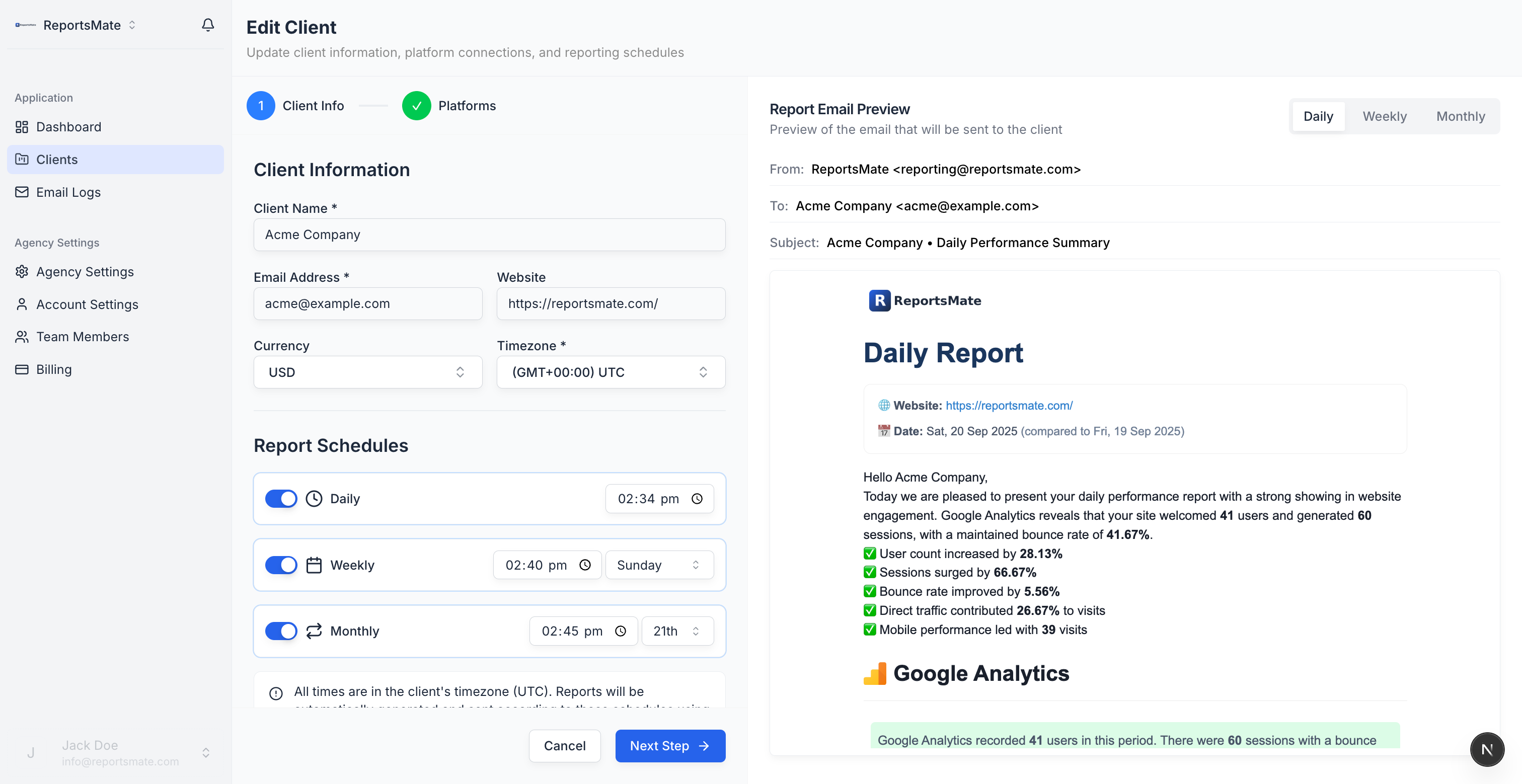
Pros: flat fee regardless of usage; no client logins; AI summaries written for non-marketers; white-label with custom sending domains; client setup takes about a minute.
Cons: no live dashboard builder - if clients demand a portal, this is not that; integrations focus on the seven core platforms rather than a long tail of niche connectors.
Pricing: flat $29/month for 20 clients, $69 for 50, $129 for 100 - all platforms on every plan.
Verdict: the best pick for agencies that want reports delivered, not dashboards hosted.
2. AgencyAnalytics - best for dashboard-heavy agencies
AgencyAnalytics is the incumbent in agency reporting, with 80+ integrations spanning social, PPC, SEO, email and call tracking. Each client gets a customisable dashboard plus scheduled PDF reports, and the white-label options (custom domain, full branding) are mature. The trade-off is the pricing model: you pay per client campaign, so costs scale linearly with your client list, and every new client means another dashboard to configure. If your clients genuinely log in and explore data, that overhead is worth it; if they just want a monthly summary, it is paying for shelf-ware.
Pros: huge integration library; polished white-label; granular staff and client permissions.
Cons: per-campaign pricing gets expensive at scale; dashboards need building and maintaining per client.
Pricing: from around US$59/month, then roughly US$12-18 per client campaign as you grow.
Verdict: the safe all-rounder if your clients actually use dashboards and your margins can carry per-client pricing.
3. DashThis - best for quick drag-and-drop dashboards
DashThis does one thing simply: drag-and-drop marketing dashboards with preset templates, priced per dashboard rather than per user. Setup is genuinely fast - pick a template, connect sources, done - and unlimited users are included on every plan. Social coverage includes Meta, Instagram, LinkedIn and TikTok alongside Google platforms. The catch is the pricing unit: at one dashboard per client, 15 clients pushes you into higher tiers quickly, and the scheduled email sends a link to the dashboard rather than a full report in the inbox.
Pros: fastest setup in this list; unlimited users; clean preset templates.
Cons: per-dashboard pricing scales poorly; emails link out rather than delivering the report; limited layout control.
Pricing: from around US$49/month for 3 dashboards; about US$139/month for 10.
Verdict: good for small teams that want presentable dashboards this afternoon, not a long-term scaling play.
4. Whatagraph - best for larger agencies with big retainers
Whatagraph sits at the premium end: highly visual cross-channel reports, data blending across sources, and even data transfer to BigQuery for agencies running their own warehouse. Reports look genuinely impressive and the platform handles large data volumes well. But it is priced like the enterprise tool it is - quote-based, annual contracts, and a starting point that only makes sense with a substantial client roster and retainers to match. Smaller agencies evaluating it almost always reach the same conclusion: beautiful, but overkill.
Pros: the best-looking reports in the category; strong cross-channel data blending; warehouse-grade data options.
Cons: pricing excludes small agencies; annual commitment; more platform than most client lists need.
Pricing: quote-based, typically from around US$249/month on annual billing.
Verdict: worth it for 50+ client agencies with premium retainers; skip it below that.
5. Swydo - best for PPC-first agencies
Swydo built its reputation on PPC reporting and monitoring, and it shows: Google Ads and Meta Ads templates are strong, monitoring alerts flag budget and KPI anomalies, and scheduled PDF reports are reliable. Pricing is per data source, which starts affordable but requires arithmetic - each client typically needs two to four connections, so per-client cost creeps up faster than the headline suggests. Organic social coverage is thinner than the management tools below, and the interface feels dated. If your "social" reporting is really paid social plus Google, Swydo does the job without fuss.
Pros: affordable entry point; useful KPI monitoring and alerts; solid paid-media templates.
Cons: per-data-source pricing compounds; weak organic social coverage; dated UI.
Pricing: from around US$49/month for 10 data sources.
Verdict: a sensible pick for lean PPC agencies that report on ads first and everything else second.
6. Metricool - best budget option for organic social
An honest category note first: Metricool is primarily a social media management tool - scheduling, inbox, competitor tracking - with reporting attached, a different category from the dedicated platforms above. We explain the difference in social media analytics vs reporting. That said, for the money it is hard to beat: a useful free tier for one brand, cheap paid plans, and analytics across Instagram, Facebook, TikTok, LinkedIn, X and YouTube, plus basic Google Ads and Meta Ads data. Reports are PPT/PDF exports rather than automated client deliverables, and white-label is restricted to higher plans.
Pros: cheapest paid entry in this list; free tier exists; covers organic social well.
Cons: reporting is an export, not an automated client deliverable; limited white-label; management features you may not need.
Pricing: free tier; paid plans from around US$22/month, agency-oriented plans higher.
Verdict: the budget choice for freelancers and small teams reporting on organic social.
7. Sendible - best for combining social management and reporting
Sendible is an agency-focused social media management platform - publishing, unified inbox, approval workflows - with built-in reporting layered on top. Like Metricool, it is a management tool first and a reporting tool second. Within that frame the reports are decent: automated scheduled delivery, a drag-and-drop report builder on higher plans, and coverage of the major social networks. Per-user pricing adds up, and reporting depth (especially on paid campaigns and non-social channels like GA4 or Search Console) trails every dedicated tool above.
Pros: posting, inbox and reporting in one subscription; approval workflows built for agencies; scheduled report delivery.
Cons: reporting is shallower than dedicated tools; little coverage beyond social channels; per-user pricing.
Pricing: from around US$29/month for one user; agency plans from about US$89/month.
Verdict: pick it for the management workflow and treat the reports as a bonus - not the other way round.
Top Social Media Reporting Tools Compared
Here's how all 7 tools stack up for agency use:
| Tool | Email Delivery | White-Label | Platforms | Pricing Model | Best For |
|---|---|---|---|---|---|
| ReportsMate | Yes (inbox-first) | Yes, incl. custom domains | Meta, LinkedIn, TikTok Ads + GA4, GAds, GSC, GBP | Flat fee ($29-$129/mo) | Email-first agencies |
| AgencyAnalytics | PDF + dashboard | Yes (paid tiers) | 80+ integrations | Per client campaign | Dashboard-heavy agencies |
| DashThis | Link to dashboard | Yes | 34+ integrations | Per dashboard | Quick visual dashboards |
| Whatagraph | PDF + live links | Yes | 55+ sources | Quote-based, annual | Large agencies |
| Swydo | Scheduled PDF | Yes | Paid media focus | Per data source | PPC-focused agencies |
| Metricool | PPT/PDF export | Higher plans | Organic social + basic ads | Freemium | Budget organic reporting |
| Sendible | Scheduled reports | Higher plans | Major social networks | Per user | Management + reports combo |
ReportsMate's key advantage: reports go directly to the client's inbox on a schedule you set. No client portal login, no dashboard link to share - just a clean branded email that clients actually read. For a side-by-side breakdown against each competitor, see the comparison hub.
If you want the wider picture beyond social channels, our automated marketing reporting guide covers reporting across every platform. For step-by-step setup, see how to automate social media reports, and if you are weighing analytics suites against reporting tools, read social media analytics vs reporting. Need a starting structure? Grab the free Meta Ads report template.
Start your free 14-day trial or see pricing.
How to Choose: Which Tool Fits Your Agency?
The right answer depends less on features and more on what kind of agency you run.
Paid-social agency - Your clients care about spend, ROAS, CPA and conversions across Meta, TikTok and LinkedIn, usually alongside Google Ads. ReportsMate (flat fee, all ad platforms plus GA4 in one email) and Swydo (PPC templates and monitoring) are the natural shortlist; AgencyAnalytics works too if clients expect a portal.
Organic-social agency - You report on content performance, engagement, reach and audience growth. Metricool or Sendible give you scheduling and analytics in one place, which is efficient if you also manage the accounts. Pair with ReportsMate if clients also need GA4, Search Console or Google Business Profile results in the same report.
Freelancer or micro-agency - Cost per client is the deciding factor. Start with Metricool's free or cheap tiers if you are purely organic, or a flat-fee tool like ReportsMate ($29/month covers 20 clients) the moment you have more than a couple of paying clients.
Whichever way you lean, run the maths at double your current client count - the pricing model you pick today is the margin you keep tomorrow.
Social Media Reporting Best Practices for Agencies
Getting the most from social media reporting tools isn't just about picking the right platform - it's about how you use them.
Report on the right metrics for each client - A local service business cares about reach and calls generated. An e-commerce brand cares about ROAS and purchase conversions. Tailor what you highlight in each report to what the client is trying to achieve.
Show period-over-period comparison - Raw numbers have no context. CTR of 1.5% means nothing without knowing it was 1.2% last month. Every metric should show the change versus the previous period.
Include a plain-language summary - Most clients aren't marketers. Explain what the numbers mean in two to three sentences at the top of each report. ReportsMate's AI insights do this automatically.
Set the right frequency - Monthly reporting suits most clients. Weekly reporting is appropriate for active campaigns with rapid budget spend. Daily reporting is rarely needed except during major campaign launches.
Use consistent branding - Every report your clients receive should look like it came from your agency. White-label email reports with your logo build brand recognition and reinforce your professional image over time.
Frequently Asked Questions
Q: What social media platforms does ReportsMate report on?
ReportsMate covers Meta Ads (Facebook + Instagram), LinkedIn Ads and TikTok Ads alongside Google Ads, Google Analytics 4, Google Search Console and Google Business Profile - all combined into a single automated email report.
Q: Do my clients need to log into a portal to see their reports?
No. Reports are delivered directly to your client's email inbox on the schedule you set. Clients receive a fully branded report with no login required - which means much higher engagement than dashboard-based tools.
Q: Can I add my agency branding to social media reports?
Yes. White-label email reports include your agency logo on every report. Custom sending domains (reports arrive from your own domain) are available on higher plans.
Q: Can I combine social media data with Google Ads and Analytics in one report?
Yes. Automated marketing reports from ReportsMate combine Meta Ads, LinkedIn Ads, TikTok Ads, Google Ads, GA4, Google Search Console and Google Business Profile into a single email. Clients see all channels in one place without switching between dashboards.
Q: What is the best free social media reporting tool?
Google's Looker Studio is the best fully free option - it connects to GA4, Google Ads and (via connectors) social platforms, but every report must be built and maintained by hand. Metricool's free tier is the best free choice for organic social analytics on a single brand. Neither offers white-label automated email delivery, which is why most agencies move to a paid tool once they pass a handful of clients.
Q: How often should agencies send social media reports?
Monthly reporting suits most retainer clients. Weekly reporting is right for active paid campaigns where budget moves fast, and daily reporting is only needed during launches or high-spend periods. Consistency matters more than frequency - a report that lands on the same day every period builds more trust than an occasional deep dive.
Conclusion
All 7 tools in this guide automate the grunt work; they differ in delivery method, depth and - above all - pricing model. Dashboard suites like AgencyAnalytics and Whatagraph suit agencies whose clients log in; management tools like Metricool and Sendible suit teams that also run the accounts; and with solutions like ReportsMate, agencies get white-label, AI-summarised reports delivered straight to the client's inbox for a flat fee. Choose the model that still makes sense at twice your current client count, and your agency stays competitive in Australia's growing digital marketing landscape.